
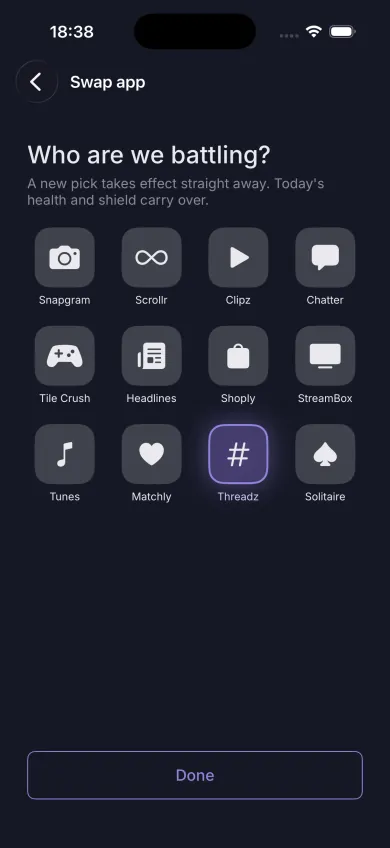
Pick your app
Choose the one app that eats your day - Instagram, TikTok, YouTube, anything. Then name your blob and give it a colour.
Screen Time and Health data stay on your iPhone
Doomblob is a tiny pet that lives on your screen time. Pick the one app you want to use less: every minute in it costs your blob health, and every walk, stair climb or workout earns shield to protect it.
Free for iPhone. No account, no subscription.
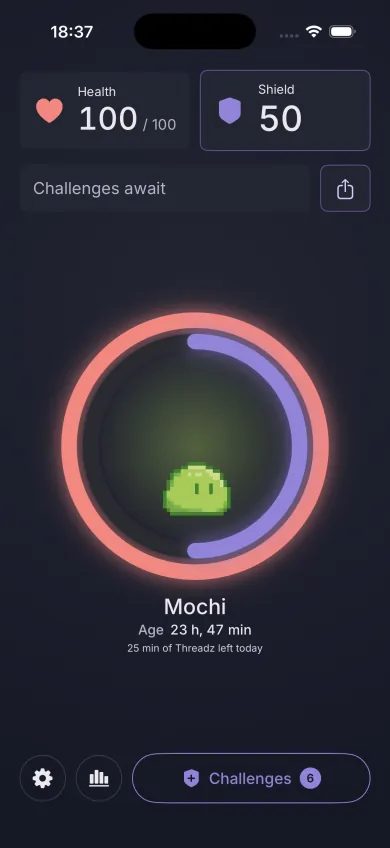
One app to battle, one blob to keep alive, one fresh start every midnight.
Choose the one app that eats your day - Instagram, TikTok, YouTube, anything. Then name your blob and give it a colour.
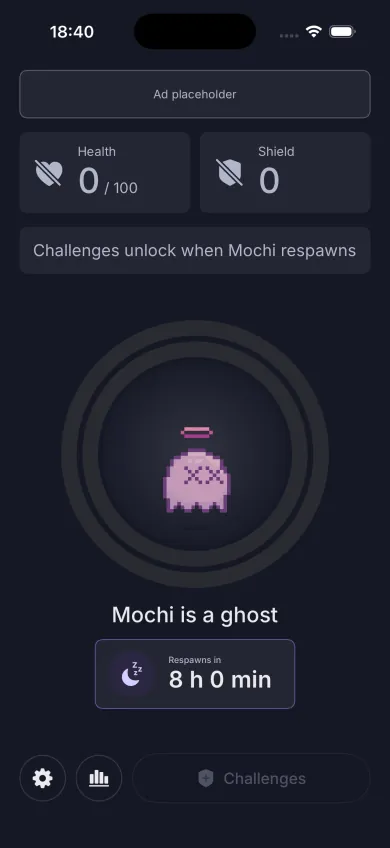
Your blob starts each day with 100 health. Time in your app drains it, and when it hits zero the blob becomes a ghost until midnight.
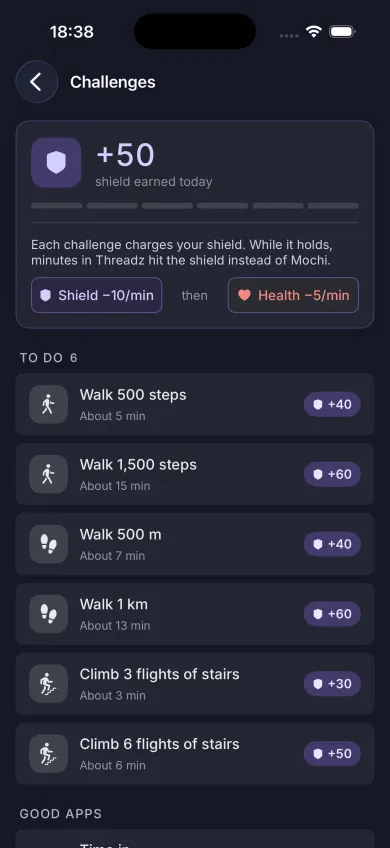
Walk, climb stairs, meditate or work out. Challenges complete on their own from Apple Health, and shield takes the damage before health does.
Doomblob never blocks an app. It gives you a reason to put the phone down yourself.
Run out of health and your blob turns into a ghost. Its age resets and nothing brings it back early. At 00:00 it respawns with full health.
On Normal a full blob lasts 50 minutes without shield. Hard gives you 20 and Extreme 10. Change level any time; it applies from the next midnight.
Pick up to two apps that are good for you, such as reading or meditation. Time in them adds shield for the first 60 minutes each day.
Wear an Apple Watch or a tracker that syncs to Apple Health? Workout, active-energy and heart-rate challenges join the list. An iPhone alone is enough to play.
Trends shows the time you won back by week, month and year, the challenges you finished and a calendar of the days your blob survived.
Name it, colour it, and the app icon follows. Share its age when you are proud of it.
Green days, close calls and ghost days, side by side with the hours you took back - by week, month and year.
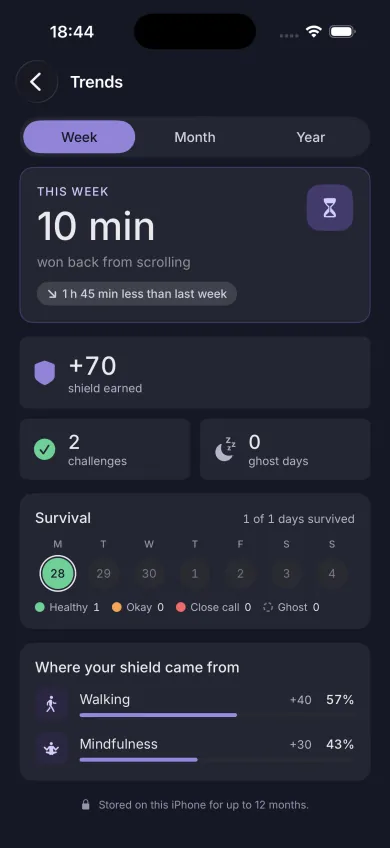
Week
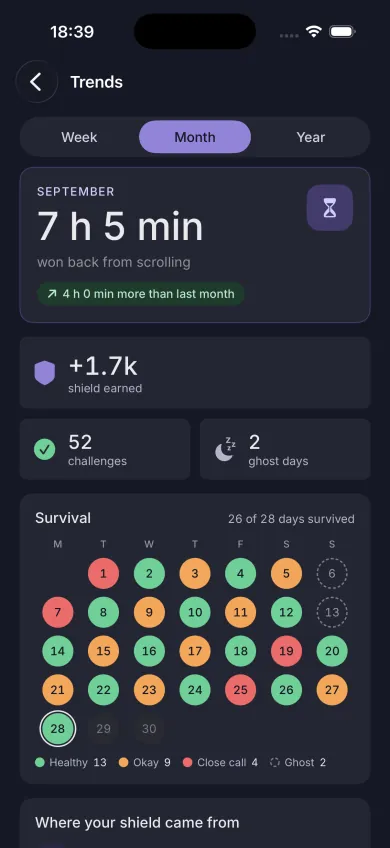
Month
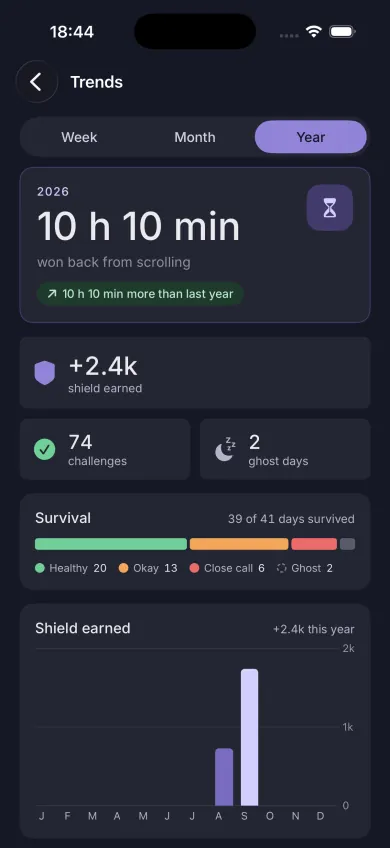
Year
Doomblob has no account and no server. Your Screen Time and Apple Health data never leave your iPhone.
You pick the app in the system picker. Doomblob learns when a minute passes in it, and nothing about your other apps.
Doomblob reads activity to complete challenges. It never writes to Apple Health, and that data is never used for ads or sent anywhere.
The free app shows a single banner ad. A one-time purchase removes it for good.
Doomblob is an app for iPhone that turns cutting down on one app into a game. You pick the app you want to use less and hatch a blob, a small virtual pet. Every minute you spend in that app costs the blob health. Walking, climbing stairs, meditating or working out earns shield that protects it. If health runs out, the blob becomes a ghost until midnight.
It makes the cost of scrolling visible and immediate. Your blob starts each day with 100 health and loses some for every minute in the app you picked, so a long scroll session has a consequence you can see. The only way to protect the blob is to do something away from the screen, which swaps scrolling time for movement or rest.
No. Doomblob never blocks, locks or hides an app. It only counts the minutes you spend in the one app you chose and shows what they cost your blob. You stay in control, and you can send yourself one reminder a day after 5, 10, 20 or 60 minutes in that app.
Doomblob uses Screen Time, the system feature built into iPhone, with your permission. You choose the app in the system app picker, and iPhone tells Doomblob when another minute has passed in it. Doomblob does not see your other apps, your browsing or what you do inside the app.
The blob becomes a ghost for the rest of the day, its age goes back to zero and challenges are paused. Nothing brings it back early. At 00:00 on your iPhone clock it respawns with full health and a new set of challenges.
Complete the daily challenges, which Doomblob checks automatically against Apple Health: steps, walking distance, flights of stairs and mindful minutes. You can also choose up to two good apps, such as a reading or meditation app, and time in them charges the shield for the first 60 minutes each day. Sharing your progress card adds shield once a day.
No. With only an iPhone you get step, distance, stair and mindful-minute challenges. If you wear an Apple Watch or another tracker that syncs to Apple Health, Doomblob adds workout, active-energy and heart-rate challenges. If a synced challenge seems slow, see why watch data can lag.
Yes. Doomblob has no account and no server. Your Screen Time and Apple Health data are read on your iPhone and never leave it. Apple Health data is read-only and is never used for advertising. The only third party in the app is the banner ad in the free version, which you can remove. The full detail is in the Privacy Policy.
Yes. Doomblob is free to download and use, with one banner ad on the Home screen. A one-time in-app purchase removes the ad for good. There is no subscription. Changed device? Here is how to restore the purchase.
Your blob and its history are stored only on your device, so deleting the app or moving to a new iPhone starts a fresh blob. The remove-ads purchase belongs to your Apple Account and can be restored for free.
Questions, bugs, or ideas for the app? We usually reply within two business days.